| Screen Map |
         o o
   ooooooOoooooo
  / .ooooo o... \
 |   o     o     |
ooo  o     o     oXoooo.
. .  o           .
     o            \
     o             o
     o              \
o |
X = Current Screen
o = Demo Screens
O = Main Nav. Screen
. = Not-Implemented | |
|
Task Points
| Displayed: |
 |
• |
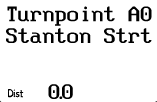
The task being edited ("A") and the current point in the task ("0",
the first taskpoint). |
|
• |
The name of the selected turnpoint |
|
• |
The cumulative distance to this point |
| • |
Press UP or DOWN to select a different turnpoint for this point in the
task. The turnpoints are sorted alphabetically. |
| • |
Press LEFT or RIGHT to view other points in the task. |
| • |
Press GO to exit the task edit screens. You will be given the option to
declare and/or start the displayed task before returning to the Main Navigation
Screen. | | |