| Screen Map |
         o o
   ooooooOoooooo
  / .ooooo o... \
 |   o     o     |
ooo  o     o     oooooo.
. .  o           .
     o            \
     o             X
     o              \
o |
X = Current Screen
o = Demo Screens
O = Main Nav. Screen
. = Not-Implemented | |
|
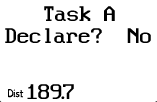
Task Declaration
| Displayed: |
 |
• |
The selected task ("A") |
|
• |
The option to declare the task ("Yes" or "No") |
|
• |
The distance of this task |
| • |
Press UP or DOWN to select "Yes" or "No". "No"
is the default to make it easy to get back to the Main Naviagation Screen
quickly. |
| • |
Press GO to declare the task (if "Yes" is selected). Pressing GO
also takes you to the Start Task Screen (whether "Yes" or "No"
is selected). | | |