| Screen Map |
         o o
   ooooooOoooooo
  / .ooooo o... \
 |   o     o     |
ooo  o     o     Xooooo.
. .  o           .
     o            \
     o             o
     o              \
o |
X = Current Screen
o = Demo Screens
O = Main Nav. Screen
. = Not-Implemented | |
|
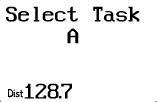
Task Selection
| Displayed: |
 |
• |
Task (A-J) |
|
• |
Distance around the displayed task. |
| • |
Press UP or DOWN to select a different task for viewing or editing (the
other tasks (B-J) are not shown in this demo). |
| • |
Press RIGHT to view or edit the turnpoints in the task. |
| • |
Press GO to exit the task edit screens. You will be given the option to
declare and/or start the displayed task before returning to the Main Navigation
Screen.
|
Note: The GPS-NAV holds 10 tasks (A-J) with up to 9 turnpoints
(0-8) per task. | |