| Screen Map |
         o o
   ooooooOoooooo
  / .ooooo X... \
 |   o     o     |
ooo  o     o     oooooo.
. .  o           .
     o            \
     o             o
     o              \
o |
X = Current Screen
o = Demo Screens
O = Main Nav. Screen
. = Not-Implemented | |
|
Task Turnpoints
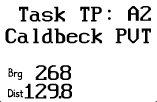
The Task Turnpoints screens allow quick selection of the turnpoints in the
current task.
| Displayed: |
 |
• |
The current task ("A") and a number representing which turnpoint
this is in the task ("2", the third turnpoint in the task). |
|
• |
Turnpoint name |
|
• |
Bearing to this turnpoint |
|
• |
Distance to this turnpoint |
| • |
Press GO to navigate to the displayed turnpoint. This, of course, also
takes you back to the Main Navigation Screen. |
| • |
Press UP or DOWN to view other task turnpoints. |
| • |
Press LEFT or RIGHT to view other screens. |
| • |
This screen appears only when a task has been started. | | |