| Screen Map |
Main Flying Screens
     .
      \
       .
        \
................X..

GO & any other key
    for ½ sec.
          |
        ...

     Configure
  ................

       Polar
    ...........

     Calibrate
  ..............
|
X = Current Screen
. = Demo Screens
|
|
|
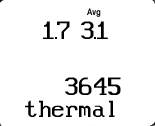
Thermal Data Screen
|
| This screen is available only when connected to a Cambridge
GPS-NAV. |
|
| See: |
 |
• |
Achieved climb rate since entering this thermal (upper left) |
|
• |
30 second averager (upper right) |
|
• |
Total height gain in this thermal (It is updated when you leave a thermal, and may
reset if you straighten out to re-center a thermal.) |
|
|
• |
Press LEFT or RIGHT to view other screens. |
|
• |
Pressing GO always takes you to the Home Screen. |
|
• |
Hold the GO key and LEFT or RIGHT arrow key to go to the Configure,
Calibrate and Defaults screens. |
|
|