|
| Adjust: |
 |
• |
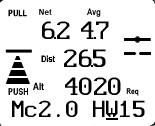
Headwind / Tailwind Component along course (bottom right), (This is calculated
automatically unless Manual ("M") is selected in the Home Screen.) |
| See: |
|
• |
Netto Average (The number displayed here can be configured.), (upper left) |
|
• |
Vario Averager (top right) |
|
• |
Distance To Goal (second row from top, right side) |
|
• |
Altitude Required based on wind component along flight path (third row from top, right
side) |
|
• |
MacCready setting (bottom left) |
|
• |
Wind component along flight path (bottom right) |
|
• |
Speed-to-Fly (Push/Pull graphics on left) |
|
• |
Glide Slope (Graphic on right shows the sailplane above the glideslope.) |
|
|
• |
Press UP or DOWN to edit the Headwind / Tailwind. |
|
• |
Press LEFT or RIGHT to view other screens. |
|
• |
Pressing GO always takes you to the Home Screen. |
|
• |
Hold the GO key and LEFT or RIGHT arrow key to go to the Configure,
Calibrate and Defaults screens. |