| Screen Map |
Main Flying Screens
     .
      \
       .
        \
......X............

GO & any other key
    for ½ sec.
          |
        ...

     Configure
  ................

       Polar
    ...........

     Calibrate
  ..............
|
X = Current Screen
. = Demo Screens
|
|
|
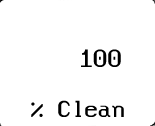
Percent Clean Screen
|
| Adjust: |
 |
• |
Percent Clean |
| See: |
|
• |
Percent Clean: 100% = No Bugs |
|
|
• |
Press UP or DOWN to edit the Percent Clean. |
|
• |
Press LEFT or RIGHT to view other screens. |
|
• |
Pressing GO always takes you to the Home Screen. |
|
• |
Hold the GO key and LEFT or RIGHT arrow key to go to the Configure,
Calibrate and Defaults screens. |
|
|