| Screen Map |
Main Flying Screens
     .
      \
       .
        \
...................

GO & any other key
    for ½ sec.
          |
        ...

     Configure
  ........X.......

       Polar
    ...........

     Calibrate
  ..............
|
X = Current Screen
. = Demo Screens
|
|
|
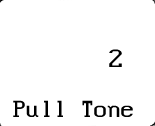
Pull Tone
|
| Select: |
 |
• |
Number of bars above line for slow-down tone, (1 = sensitive, 5 = off). This
setting determines the speed error at which you will get an audio alert tone. The
speed error for the first graphic speed bar is about 3 kts (5 kph). Each additional
speed bar appears with a speed error increase of 7 knots (11 kph). |
|
|
• |
Press UP or DOWN to edit the Pull Tone threshold. |
|
• |
Press LEFT or RIGHT to view other screens. |
|
• |
Press GO to save changes and return to the flying screen you were in before entering
configure mode. |
|
|