| Screen Map |
Main Flying Screens
     .
      \
       .
        \
...................

GO & any other key
    for ½ sec.
          |
        ...

     Configure
  ......X.........

       Polar
    ...........

     Calibrate
  ..............
|
X = Current Screen
. = Demo Screens
|
|
|
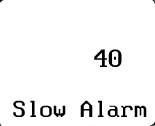
Slow Alarm
|
| Note: This screen appears only if the optional G-Meter
has been installed. |
|
| Adjust: |
 |
• |
Slow Alarm speed in user units (Knots or Km/hr). This is the threshold airspeed
below which you will get the slow alarm tone in straight flight with no water
ballast. A reasonable setting is approximately 10% above the glider's stall speed. |
|
|
• |
Press UP or DOWN to edit the Slow Alarm Speed |
|
• |
Press LEFT or RIGHT to view other screens. |
|
• |
Press GO to save changes and return to the flying screen you were in before entering
configure mode. |
|
|