| Screen Map |
Main Flying Screens
     .
      \
       .
        \
...................

GO & any other key
    for ½ sec.
          |
        ...

     Configure
  ...........X....

       Polar
    ...........

     Calibrate
  ..............
|
X = Current Screen
. = Demo Screens
|
|
|
Units
|
| Select: |
 |
• |
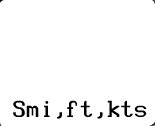
[Km,m,m/s], [Nmi,ft,kts], [Smi,ft,kts]
or [Km,ft,kts]. This switch selects the basic units for distance,
altitude, and vertical or horizontal speed. In Nautical miles (Nmi) or Statute miles
(Smi), horizontal speed is measured in Knots. |
|
|
• |
Press UP or DOWN to select the desired option. |
|
• |
Press LEFT or RIGHT to view other screens. |
|
• |
Press GO to save changes and return to the flying screen you were in before entering
configure mode. |
|
|