| Screen Map |
Main Flying Screens
     .
      \
       .
        \
...................

GO & any other key
    for ½ sec.
          |
        ...

     Configure
  ................

       Polar
    ...........

     Calibrate
  .......X......
|
X = Current Screen
. = Demo Screens
|
|
|
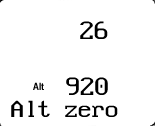
Altimeter Zero
|
| Adjust: |
 |
• |
Altimeter Zero - This parameter interacts with the Altimeter Gain setting.
Calibration requires a reference altimeter and a pressure/vacuum source. |
| See: |
|
• |
Altimeter Zero |
|
• |
Altitude |
|
|
• |
Press UP or DOWN to adjust the parameter. |
|
• |
Press LEFT or RIGHT to view other screens. |
|
• |
Press GO to save changes and return to the flying screen you were in
before entering calibrate mode. |
|
|