| Screen Map |
Main Flying Screens
     .
      \
       .
        \
...................

GO & any other key
    for ½ sec.
          |
        ...

     Configure
  ................

       Polar
    ...........

     Calibrate
  ...........X..
|
X = Current Screen
. = Demo Screens
|
|
|
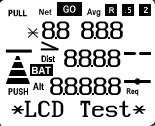
LCD Test Screen
|
| See: |
 |
• |
All the display items on the LCD screen. |
|
|
• |
Press UP to cycle through the speed-to-fly bars. |
|
• |
Press DOWN to cycle through the graphical glide slopes. |
|
• |
Press LEFT or RIGHT to view other screens. |
|
• |
Press GO to see a special message in the bottom line of the L-NAV display
(not implemented in this demo). After the message is completed any changes are saved
and the L-NAV returns to the flying screen you were in before entering calibrate mode. |
|
|