| Screen Map |
         o o
   ooooooOoooooo
  / .ooooo o... \
 |   o     o     |
ooo  o     o     oooooX.
. .  o           .
     o            \
     o             o
     o              \
o |
X = Current Screen
o = Demo Screens
O = Main Nav. Screen
. = Not-Implemented | |
|
Task Point
| Displayed: |
 |
• |
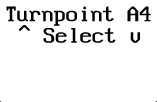
The task being edited ("A") and the current point in the task ("4",
the fifth taskpoint). |
|
• |
The "^ Select v" indicator is used to signify that there are no
more turnpoints in the task. It is located between the first and last turnpoints
in the list when selecting turnpoints with the UP and DOWN buttons. |
| • |
Press UP or DOWN to select a turnpoint for this point in the task. The
turnpoints are sorted alphabetically. |
| • |
Press LEFT or RIGHT to view other points in the task. |
| • |
Press GO to exit the task edit screens. You will be given the option to
declare and/or start the displayed task before returning to the Main Navigation
Screen. | | |